
This guide explains how patients and doctors can pause (deactivate) or permanently delete a Pocket Med account. Admin accounts are managed separately by your organization administrator.
Pause vs. permanent deletion
There are two self-service options:
- Pause account: Temporarily deactivates your account while keeping your data. You can sign back in or reactivate at any time. Paused accounts that remain inactive for more than 30 days may be permanently deleted automatically.
- Delete account: Permanently removes your account and associated data. This action cannot be undone.
Delete your account in the app
Patients
- Open the Pocket Med patient app and sign in.
- Go to Settings → Account.
- Select Delete account.
- Read the confirmation message carefully and confirm deletion.
- You will be signed out and your account will be permanently removed.
Doctors
- Open the Pocket Med doctor app and sign in.
- Go to Settings → Account.
- Select Delete account.
- Confirm that you understand this will remove your profile, appointments, and related data.
- Your account will be permanently deleted and you will be signed out.
Pause your account in the app
Instead of deleting, you can pause your account from the same account settings screen:
- Go to Settings → Account.
- Select Pause account (or Deactivate account).
- Confirm the action. You will be signed out.
- To return, sign in with your email and password, or use the in-app reactivate option.
Step-by-step with screenshots
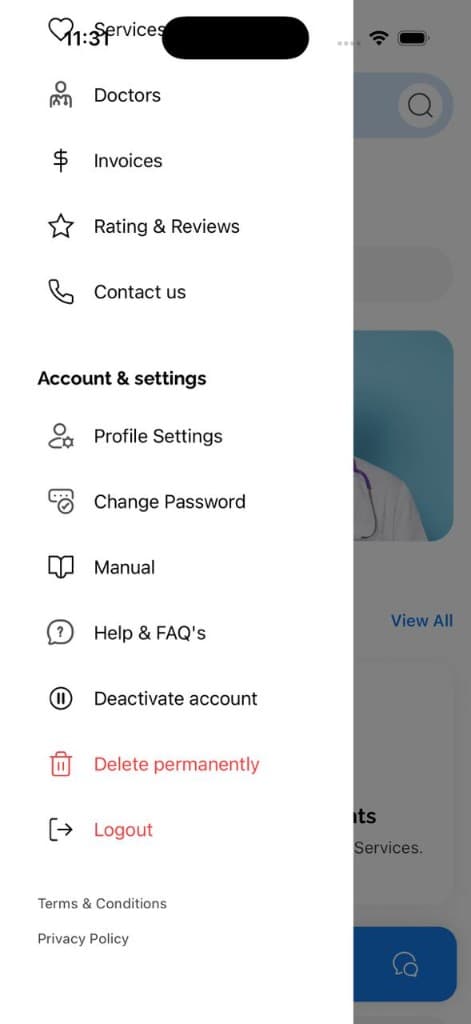
Open the side menu and scroll to Account & settings. From there you can choose Deactivate account (pause) or Delete permanently.
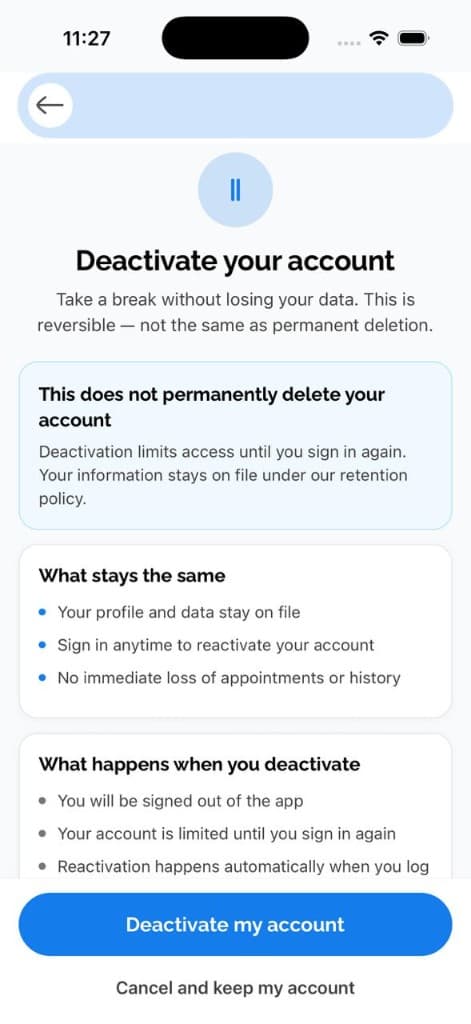
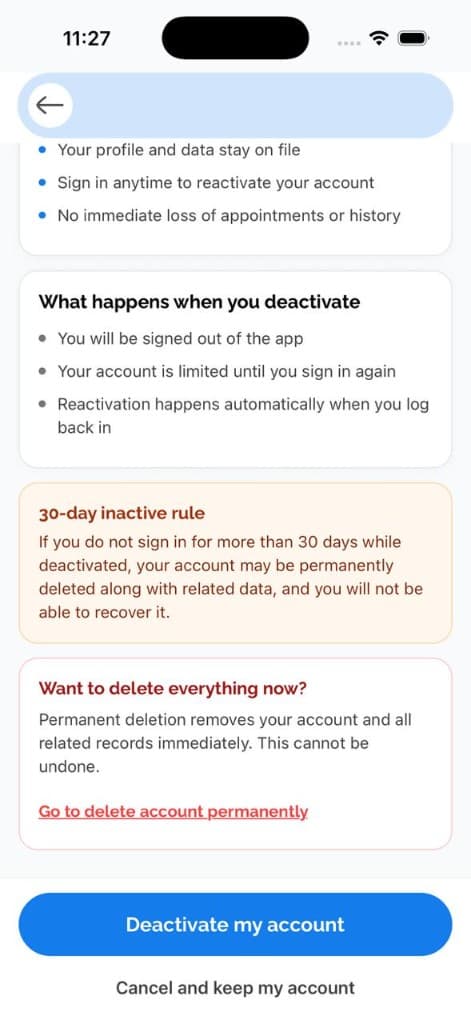
Deactivate (pause) your account
Deactivating keeps your data on file and is reversible — sign back in any time to restore access. Review what happens, then tap Deactivate my account.
Delete your account permanently
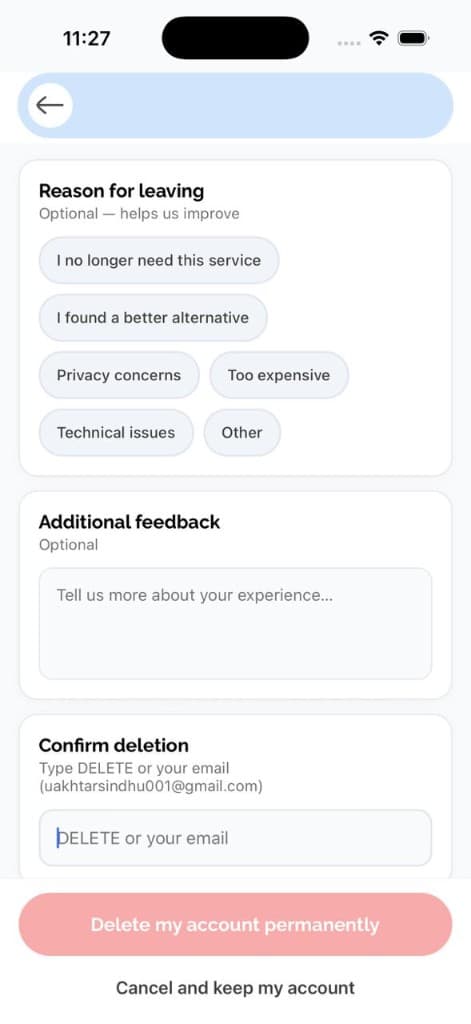
Permanent deletion removes your account and all related data immediately and cannot be undone. You will be asked for an optional reason and to type DELETE (or your email) to confirm.
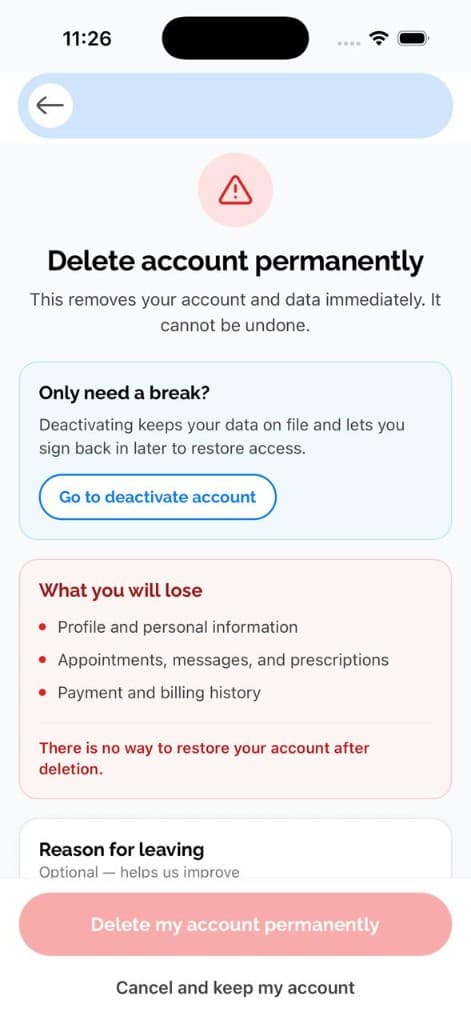
What gets deleted
When you permanently delete your account, Pocket Med removes data associated with your profile, including:
- Profile and account information
- Appointments and related records
- Messages and chat history
- Prescriptions and medical entries tied to your account
- Notifications, reviews, and payment records linked to your user
- Subscriptions and provider-specific settings (for doctors)
Some information may be retained where required by law, for fraud prevention, or to resolve disputes. Payment records held by our payment processor may also be subject to their retention policies.
30-day retention for paused accounts
If you pause your account and do not reactivate within 30 days, Pocket Med may automatically and permanently delete your account using the same process as manual deletion. You will not be able to recover your data after that point.
Blocked accounts
If your account has been blocked by an administrator for policy violations, you cannot self-reactivate. Contact support@Pocketmed.online for assistance.
Request deletion by email
If you cannot access the app, email support@Pocketmed.online from the email address registered to your account with the subject line "Account deletion request". Include your full name and whether you are a patient or doctor. We may ask you to verify your identity before processing the request.
Related policies
See our Privacy Policy and Terms of Use for more information about how we handle your data.